I inadvertantly removed the flash-plugin from my 64-bit system and figuring out how to reinstall the thing took about two hours, so I thought I'd write the steps down:
Update 2009/02/21
Finally, Adobe has released a 64-bit Flash plugin:
http://labs.adobe.com/technologies/flashplayer10/
And, shocker of shockers, it actually works!
To Install Flash Plugin on x86-64
You'll download the tarball from here:
http://labs.adobe.com/downloads/flashplayer10.html
The only thing in the tarball is libflashplayer.so. To install the 64-bit Flash plugin, simply move libflashplayer.so into your user's .mozilla/plugins directory and restart Firefox.
Even more amazing, the bloody thing works on my Fedora 10, x86-64 virtual machine running in VMware Fusion on my MacBook Pro! Yee haw!
Awesome!
end update
Update 2008/12/19
As my recent build of Fedora 9 may have gotten corrupted by bad ATrpms repo files, I upgraded AGAIN, this time to Fedora 10, x86_64. Here are some nice instructions for the Fedora 10 Flash install:
http://fedoraproject.org/wiki/Flash
I learned a new trick in Firefox to check plugins. Type "about:plugins" in the URL bar.
end update
Update 2008/11/18
I just upgraded to Fedora 9, x86_64. Here are some nice instructions for the Fedora 9 Flash install:
http://fedorasolved.org/browser-solutions/flash
http://macromedia.mplug.org/
end update
As Flash 9 was not built for 64-bit systems, I'll need to install nspluginwrapper to get Flash to work on my Fedora 7, 64-bit box.
1) install nspluginwrapper
yum install nspluginwrapper
Installed Packages
Name : nspluginwrapper
Arch : x86_64
Version: 1.0.0
Release: 1
Size : 124 k
Repo : installed
Summary: A compatibility layer for Netscape 4 plugins
Description:
nspluginwrapper makes it possible to use Netscape 4 compatible plugins
compiled for i386 into Mozilla for another architecture, e.g. x86_64.
This package consists in:
* npviewer: the plugin viewer
* npwrapper.so: the browser-side plugin
* nspluginwrapper: a tool to manage plugins installation and update
2) Download the flash 9 install
wget http://fpdownload.macromedia.com/get/flashplayer/current/install_flash_player_9_linux.tar.gz
3) Unpack the tarball
gunzip install_flash_player_9_linux.tar.gz
tar xvf install_flash_player_9_linux.tar
4) From the install directory created from the extract, copy libflashplayer.so to Mozilla's plugin directory:
cp libflashplayer.so /usr/lib/mozilla/plugins/
5) Use nspluginwrapper to enable the 32-bit flash to work in 64-bit Firefox
nspluginwrapper -i /usr/lib/mozilla/plugins/libflashplayer.so
6) Restart Firefox.
Lovely, now YouTube works again.
that's all folks!
mule
Showing posts with label firefox. Show all posts
Showing posts with label firefox. Show all posts
Sunday, November 02, 2008
flash player 9 install in Fedora 7/9/10 64-bit


If this post was useful to you..consider buying me a beer via PayPal!
Even a $1 Draft will keep the Mule happily working..and help pay for equipment upgrades!

Wednesday, May 02, 2007
user agent switcher for older web apps
Perhaps foolishly, I installed the latest version of IE, IE7. I noticed it broke the browser sniffers of some of the older web applications I access. After searching for a plugin for Firefox to simulate any pre-IE7 versions of Internet Explorer, I found this lovely piece of work from the master, Chris Pederick called the User Agent Switcher for Firefox:
http://chrispederick.com/work/useragentswitcher/
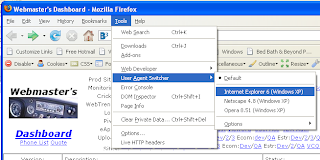
It has saved me on numerous occasions from having to remotely login to another server in order to use an older version of IE.
Thanks Chris! We love ya!
In the opposite vein, I also found a plugin called Mask IE:
http://projectdistributor.net/Projects/Project.aspx?projectId=164
that allows for switching of user agents for IE; however, the .Net framework version that it calls for is obscure (2.0.50727) and I did not want to get into the hassle of tracking down and updating the .Net Framework just for one app.
Update 1/25/2008
For IE7, here's a link I had forgotten about that explains how to tweak your Windows Registry to set your IE user-agent:
http://blogs.msdn.com/ie/archive/2005/04/27/412813.aspx
The reg tweak is here:
http://www.fiddlertool.com/useragent.aspx
This registry update allowed me to view our old WebTrends 6.0 portal. The portal does a browser sniff that precludes the use of any browsers over IE6.0. More importantly, you can easily reverse the registry update.
cheers,
the mule
http://chrispederick.com/work/useragentswitcher/

It has saved me on numerous occasions from having to remotely login to another server in order to use an older version of IE.
Thanks Chris! We love ya!
In the opposite vein, I also found a plugin called Mask IE:
http://projectdistributor.net/Projects/Project.aspx?projectId=164
that allows for switching of user agents for IE; however, the .Net framework version that it calls for is obscure (2.0.50727) and I did not want to get into the hassle of tracking down and updating the .Net Framework just for one app.
Update 1/25/2008
For IE7, here's a link I had forgotten about that explains how to tweak your Windows Registry to set your IE user-agent:
http://blogs.msdn.com/ie/archive/2005/04/27/412813.aspx
The reg tweak is here:
http://www.fiddlertool.com/useragent.aspx
This registry update allowed me to view our old WebTrends 6.0 portal. The portal does a browser sniff that precludes the use of any browsers over IE6.0. More importantly, you can easily reverse the registry update.
cheers,
the mule
If this post was useful to you..consider buying me a beer via PayPal!
Even a $1 Draft will keep the Mule happily working..and help pay for equipment upgrades!
Subscribe to:
Posts (Atom)


