Over the weekend, I created a VMware Partner Account and got my Fedora 10, x86-64 virtual machine approved to be listed on VMware's Virtual Appliance listings:
http://www.vmware.com/appliances/directory/148183
If you want to try out Cinelerra and you use 64-bit VMware Player, Workstation or Server, this is an easy way to get started. I'd appreciate someone giving it a shot and letting me know how it works.
the mule
Showing posts with label 64-bit. Show all posts
Showing posts with label 64-bit. Show all posts
Wednesday, May 13, 2009
VMware virtual appliance for video editing


If this post was useful to you..consider buying me a beer via PayPal!
Even a $1 Draft will keep the Mule happily working..and help pay for equipment upgrades!

Monday, November 17, 2008
Fedora 9 x86-64, Cinelerra dependencies
I'm happy to report that the installation of Fedora 9 x86-64 went very smoothly tonight. I yanked down a DVD install from here via torrent. I then burnt an ISO dvd of Fedora 9 using my own instructions here. From the perspective of a Cinelerra advocate, the biggest change from Fedora 7 is that Fedora 9 is more reliant on the ATrpms repository for Cinelerra source code dependencies.
Update 2009/02/15
Since writing this article, I've had very strange crashes and hangs from Cinelerra on Fedora 9. So I've moved on to using Fedora 10 x86-64. The general steps listed below to install Cinelerra still apply, but here's a post that summarizes the steps on how to build Cinelerra from source on Fedora 10, x86-64
*** end update ***
Advice on the Use of Repositories
As a general note, use as few repositories as possible for the various Cinelerra dependencies. Mixing many repos will result in a compile that doesn't work or worse, poor performance or odd behavior in Cinelerra resulting from slightly incompatible libraries. I've lived both and the latter is far worse because you'll spend hours or days pulling your hair out when, in the end, you've got some natty problem that only occurs between this library or that library. Ugh! I get the shivers just thinking about it!
Building Cinelerra from Source?
If you're using Cinelerra on Fedora 9 and want to build Cinelerra from source, here's what you need to do. There will be only three repos needed:
1) Fedora
2) ATrpms
3) Freshrpms (only for mjpegtools)
12/17/2008 NOTE on my strikethrough above
It was brought to my attention that RPM Fusion is the new repository of the repositories for Fedora (a note about Fedora and ATrpms). As I experimented more with my Fedora 9 build, I found an issue with Cinelerra hanging that I will describe in a later post. I fixed the problem by removing the ATrpms dependencies and adding RPMFusion as the only additional Fedora repository.
To reiterate, going forward, I am only using RPM Fusion in addition to Fedora's own repo.
The text below has been updated to reflect this new reality.
end NOTE
There will be only two repos needed:
1) Fedora
2) RPM Fusion
Here are the steps
1) install base Fedora 9 by selecting Office/Productivity and Development tools
2) The set of Cinelerra dependencies will come mainly from the RPM Fusion repository, so add the Fusion repo from here:
http://rpmfusion.org/Configuration
3) In addition to the Fedora repo, you'll now have RPMFusion added as a repository. Use the following script to install core programs for the Cinelerra build. Don't forget to chmod a+x your script!
yum install gsm-devel \
libvorbis* \
libogg* \
libtool* \
libtheora* \
libpng* \
libjpeg* \
libtiff* \
esound* \
audiofile* \
libraw1394* \
libavc1394* \
freetype* \
fontconfig* \
nasm \
e2fsprogs* \
OpenEXR* \
fftw \
fftw-devel \
libsndfile* \
libiec61883* \
libdv* \
libquicktime \
ffmpeg \
xvidcore* \
lame \
lame-devel \
a52* \
faad2* \
x264* \
mjpegtools \
faac*
4) As the Cinelerra CVS source code is no longer available via subversion, install git:
yum install git
Here's a good intro to git
Another good git reference
http://www-cs-students.stanford.edu/~blynn/gitmagic/ch02.html
Here are a couple useful git commands:
To find an earlier version of source code:
git whatchanged --since="20 weeks ago"
To checkout an earlier version of source code:
git checkout [revision number]
example:
git checkout d91e062cadb8a5a7b8c35e9092234948d6918767
5) Grab the Cinelerra CVS source:
git clone git://git.cinelerra.org/j6t/cinelerra.git cinelerra_source
6) Run autogen.sh
[mule@ogre cinelerra_source]# ./autogen.sh
User defined paths to the preferred autoconf and automake versions.
Read the script if you would like to modify them.
AUTOMAKE=automake
ACLOCAL=aclocal
AUTOCONF=autoconf
AUTOHEADER=autoheader
..
7) Run configure
[mule@ogre cinelerra_source]# ./configure
checking build system type... x86_64-unknown-linux-gnu
checking host system type... x86_64-unknown-linux-gnu
checking target system type... x86_64-unknown-linux-gnu
checking for a BSD-compatible install... /usr/bin/install -c
checking whether build environment is sane... yes
checking for a thread-safe mkdir -p... /bin/mkdir -p
checking for gawk... gawk
..
8) Hopefully, configure ran properly and shows that you have all the prerequisites for a build from source:
Summary of mandatory components:
libogg found
libvorbis found
libvorbisenc found
libvorbisfile found
libtheora found
OpenEXR found
libdv found
libpng found
libjpeg libraries found
libjpeg headers found
libtiff libraries found
libtiff headers found
FreeType 2 found
libx264 libraries found
libx264 headers found
libuuid libraries found
libuuid headers found
mjpegtools found
libfftw3 libraries found
libfftw3 headers found
liba52 libraries found
liba52 headers found
libmp3lame libraries found
libmp3lame headers found
libsndfile libraries found
libsndfile headers found
libfaac libraries found
libfaac headers found
libfaad libraries found
libfaad headers found
Summary of optional components:
ESD subsystem found
ESD (Enlightenment Sound Daemon) is enabled
ALSA subsystem found
ALSA is enabled
libraw1394 found
libiec61883 found
libavc1394 libraries found
libavc1394 headers found
librom1394 libraries found
librom1394 headers found
Firewire is enabled
OpenGL 2.0 libraries found
Hardware acceleration using OpenGL 2.0 is enabled
Now type
make
to start compilation.
9) Run "make"
10) Hopefully, there were no errors on make, so run "make install"
11) As the topper, don't forget to install some media players and extra encoding tools!:
yum install avidemux mencoder mplayer transcode audacious vnc
Good luck!
The Mule
Update 2008/11/23
I verified that importing live HDV video from my cam via test-mpeg2 still works. This is done with the following command:
test-mpeg2 -r [node] [file]
end update
Update 2009/02/15
Since writing this article, I've had very strange crashes and hangs from Cinelerra on Fedora 9. So I've moved on to using Fedora 10 x86-64. The general steps listed below to install Cinelerra still apply, but here's a post that summarizes the steps on how to build Cinelerra from source on Fedora 10, x86-64
*** end update ***
Advice on the Use of Repositories
As a general note, use as few repositories as possible for the various Cinelerra dependencies. Mixing many repos will result in a compile that doesn't work or worse, poor performance or odd behavior in Cinelerra resulting from slightly incompatible libraries. I've lived both and the latter is far worse because you'll spend hours or days pulling your hair out when, in the end, you've got some natty problem that only occurs between this library or that library. Ugh! I get the shivers just thinking about it!
Building Cinelerra from Source?
If you're using Cinelerra on Fedora 9 and want to build Cinelerra from source, here's what you need to do. There will be only three repos needed:
1) Fedora
2) ATrpms
3) Freshrpms (only for mjpegtools)
12/17/2008 NOTE on my strikethrough above
It was brought to my attention that RPM Fusion is the new repository of the repositories for Fedora (a note about Fedora and ATrpms). As I experimented more with my Fedora 9 build, I found an issue with Cinelerra hanging that I will describe in a later post. I fixed the problem by removing the ATrpms dependencies and adding RPMFusion as the only additional Fedora repository.
To reiterate, going forward, I am only using RPM Fusion in addition to Fedora's own repo.
The text below has been updated to reflect this new reality.
end NOTE
There will be only two repos needed:
1) Fedora
2) RPM Fusion
Here are the steps
1) install base Fedora 9 by selecting Office/Productivity and Development tools
2) The set of Cinelerra dependencies will come mainly from the RPM Fusion repository, so add the Fusion repo from here:
http://rpmfusion.org/Configuration
3) In addition to the Fedora repo, you'll now have RPMFusion added as a repository. Use the following script to install core programs for the Cinelerra build. Don't forget to chmod a+x your script!
yum install gsm-devel \
libvorbis* \
libogg* \
libtool* \
libtheora* \
libpng* \
libjpeg* \
libtiff* \
esound* \
audiofile* \
libraw1394* \
libavc1394* \
freetype* \
fontconfig* \
nasm \
e2fsprogs* \
OpenEXR* \
fftw \
fftw-devel \
libsndfile* \
libiec61883* \
libdv* \
libquicktime \
ffmpeg \
xvidcore* \
lame \
lame-devel \
a52* \
faad2* \
x264* \
mjpegtools \
faac*
4) As the Cinelerra CVS source code is no longer available via subversion, install git:
yum install git
Here's a good intro to git
Another good git reference
http://www-cs-students.stanford.edu/~blynn/gitmagic/ch02.html
Here are a couple useful git commands:
To find an earlier version of source code:
git whatchanged --since="20 weeks ago"
To checkout an earlier version of source code:
git checkout [revision number]
example:
git checkout d91e062cadb8a5a7b8c35e9092234948d6918767
5) Grab the Cinelerra CVS source:
git clone git://git.cinelerra.org/j6t/cinelerra.git cinelerra_source
6) Run autogen.sh
[mule@ogre cinelerra_source]# ./autogen.sh
User defined paths to the preferred autoconf and automake versions.
Read the script if you would like to modify them.
AUTOMAKE=automake
ACLOCAL=aclocal
AUTOCONF=autoconf
AUTOHEADER=autoheader
..
7) Run configure
[mule@ogre cinelerra_source]# ./configure
checking build system type... x86_64-unknown-linux-gnu
checking host system type... x86_64-unknown-linux-gnu
checking target system type... x86_64-unknown-linux-gnu
checking for a BSD-compatible install... /usr/bin/install -c
checking whether build environment is sane... yes
checking for a thread-safe mkdir -p... /bin/mkdir -p
checking for gawk... gawk
..
8) Hopefully, configure ran properly and shows that you have all the prerequisites for a build from source:
Summary of mandatory components:
libogg found
libvorbis found
libvorbisenc found
libvorbisfile found
libtheora found
OpenEXR found
libdv found
libpng found
libjpeg libraries found
libjpeg headers found
libtiff libraries found
libtiff headers found
FreeType 2 found
libx264 libraries found
libx264 headers found
libuuid libraries found
libuuid headers found
mjpegtools found
libfftw3 libraries found
libfftw3 headers found
liba52 libraries found
liba52 headers found
libmp3lame libraries found
libmp3lame headers found
libsndfile libraries found
libsndfile headers found
libfaac libraries found
libfaac headers found
libfaad libraries found
libfaad headers found
Summary of optional components:
ESD subsystem found
ESD (Enlightenment Sound Daemon) is enabled
ALSA subsystem found
ALSA is enabled
libraw1394 found
libiec61883 found
libavc1394 libraries found
libavc1394 headers found
librom1394 libraries found
librom1394 headers found
Firewire is enabled
OpenGL 2.0 libraries found
Hardware acceleration using OpenGL 2.0 is enabled
Now type
make
to start compilation.
9) Run "make"
10) Hopefully, there were no errors on make, so run "make install"
11) As the topper, don't forget to install some media players and extra encoding tools!:
yum install avidemux mencoder mplayer transcode audacious vnc
Good luck!
The Mule
Update 2008/11/23
I verified that importing live HDV video from my cam via test-mpeg2 still works. This is done with the following command:
test-mpeg2 -r [node] [file]
end update
If this post was useful to you..consider buying me a beer via PayPal!
Even a $1 Draft will keep the Mule happily working..and help pay for equipment upgrades!
Friday, February 08, 2008
Why Cinelerra?
I received a question from a person unfamiliar with Cinelerra and I thought that my response should be shared. The person has a friend who runs Cinelerra in Ubuntu and he wanted a more experienced users' perspective on how Cinelerra compares to the more established, commercial packages like Premiere or Vegas. Here is how I responded to him.
Cinelerra is very powerful software if you can overcome some of its idiosyncracies. Idiosyncracies like:
1) it is difficult to install for most people
2) it sometimes crashes. There are more crashes on 32-bit systems. However, the consequences of a crash aren't bad, as you can simply restart Cinelerra, load the automatically generated backup file and pick up where you left off.
3) rendering to final formats is challenging
Cinelerra is buggy in a consistent way. In other words, if you have the time and energy to figure out what works and what doesn't work, then you can base a workflow around that. But that effort is a huge time sink.
It doesn't get any better when you upgrade your system, because what once
worked in a previous distro will break in your new distro. So, you spend
oodles of time figuring out how to fix it.
It takes a certain kind of person who relishes the constant challenges of Cinelerra and Linux to power through these difficulties. Cinelerra is not everyone's cup of tea for sure, but you can get usable content out of Cinelerra if you know what works and what doesn't. Otherwise, save your valuable time and effort, buy a dual quad core Mac or PC with Final Cut Pro or Avid or Premiere or Vegas and be happy that everything works out of the box. Which isn't always the case even with those softwares.
Because Cinelerra is free software, it will never be as well supported as those commercial products. That being said, I have Cinelerra installed on Fedora 10 x86, 64-bit and the only time it has crashed is when I've done something stupid like try to write to a filesystem that is full or trigger a known bug, like using the broken DV import-record function.
I have spent the last two years learning the software and documenting specific processes using Cinelerra. You might glean some useful information by subscribing to my blog's RSS feed, because it documents the challenges I face in getting the software to work properly:
http://crazedmuleproductions.blogspot.com/
I would suggest that a 64-bit machine is most stable for Cinelerra, moreso than a 32-bit machine. That is due to the fact that the 64-bit build will take full advantage of the memory resources on your computer and video editing is very taxing on a computers memory.
From the conversations on http://cvs.cinelerra.org/, the largest installed base of users seems to be on Ubuntu, Fedora and Debian distros. I would suggest starting with one of those distros, as many people on the CVS will be able to help you if you encounter problems.
There are two versions of Cinelerra. The original version you can get from http://www.heroinewarrior.com/, but the author does not support the software. The most actively supported version of the software is the Community Version (CV) and can be found on http://cvs.cinelerra.org/. That community of which I am part, has done significant work to fix bugs, accumulate and pass on knowledge to people interested in this great, free software and video editing in general.
The RPMFusion repository is the one main Fedora repository has Cinelerra RPMs for most recent Fedora versions:
rpmfusion.org
Information on installing Cinelerra for all other distributions can be found here:
http://cvs.cinelerra.org/getting_cinelerra.php
Here is a list of related articles regarding first-time installations on Fedora:
Getting Started with Cinelerra
Building Cinelerra on 64-bit Fedora 9 from Source
Beginner's Guide to Exporting Video from Cinelerra
Exports and Linux Player Compatibility Chart from the article Render Compatibility on Fedora 10, x86-64
Cinelerra for Grandma
Finally, if you don't want to fuss with your own install, you may download one of two VMware virtual machines that I have created specifically for video editing with Cinelerra and all the tools you need to get started:
Fedora Core 6, 32-bit VMware virtual machine ~1GB
Fedora 10, x86-64 VMware virtual machine ~3GB
The Mule
Cinelerra is very powerful software if you can overcome some of its idiosyncracies. Idiosyncracies like:
1) it is difficult to install for most people
2) it sometimes crashes. There are more crashes on 32-bit systems. However, the consequences of a crash aren't bad, as you can simply restart Cinelerra, load the automatically generated backup file and pick up where you left off.
3) rendering to final formats is challenging
Cinelerra is buggy in a consistent way. In other words, if you have the time and energy to figure out what works and what doesn't work, then you can base a workflow around that. But that effort is a huge time sink.
It doesn't get any better when you upgrade your system, because what once
worked in a previous distro will break in your new distro. So, you spend
oodles of time figuring out how to fix it.
It takes a certain kind of person who relishes the constant challenges of Cinelerra and Linux to power through these difficulties. Cinelerra is not everyone's cup of tea for sure, but you can get usable content out of Cinelerra if you know what works and what doesn't. Otherwise, save your valuable time and effort, buy a dual quad core Mac or PC with Final Cut Pro or Avid or Premiere or Vegas and be happy that everything works out of the box. Which isn't always the case even with those softwares.
Because Cinelerra is free software, it will never be as well supported as those commercial products. That being said, I have Cinelerra installed on Fedora 10 x86, 64-bit and the only time it has crashed is when I've done something stupid like try to write to a filesystem that is full or trigger a known bug, like using the broken DV import-record function.
I have spent the last two years learning the software and documenting specific processes using Cinelerra. You might glean some useful information by subscribing to my blog's RSS feed, because it documents the challenges I face in getting the software to work properly:
http://crazedmuleproductions.blogspot.com/
I would suggest that a 64-bit machine is most stable for Cinelerra, moreso than a 32-bit machine. That is due to the fact that the 64-bit build will take full advantage of the memory resources on your computer and video editing is very taxing on a computers memory.
From the conversations on http://cvs.cinelerra.org/, the largest installed base of users seems to be on Ubuntu, Fedora and Debian distros. I would suggest starting with one of those distros, as many people on the CVS will be able to help you if you encounter problems.
There are two versions of Cinelerra. The original version you can get from http://www.heroinewarrior.com/, but the author does not support the software. The most actively supported version of the software is the Community Version (CV) and can be found on http://cvs.cinelerra.org/. That community of which I am part, has done significant work to fix bugs, accumulate and pass on knowledge to people interested in this great, free software and video editing in general.
The RPMFusion repository is the one main Fedora repository has Cinelerra RPMs for most recent Fedora versions:
rpmfusion.org
Information on installing Cinelerra for all other distributions can be found here:
http://cvs.cinelerra.org/getting_cinelerra.php
Here is a list of related articles regarding first-time installations on Fedora:
Getting Started with Cinelerra
Building Cinelerra on 64-bit Fedora 9 from Source
Beginner's Guide to Exporting Video from Cinelerra
Exports and Linux Player Compatibility Chart from the article Render Compatibility on Fedora 10, x86-64
Cinelerra for Grandma
Finally, if you don't want to fuss with your own install, you may download one of two VMware virtual machines that I have created specifically for video editing with Cinelerra and all the tools you need to get started:
Fedora Core 6, 32-bit VMware virtual machine ~1GB
Fedora 10, x86-64 VMware virtual machine ~3GB
The Mule
If this post was useful to you..consider buying me a beer via PayPal!
Even a $1 Draft will keep the Mule happily working..and help pay for equipment upgrades!
Sunday, October 14, 2007
rendering on the dual quad core Dell SC1430
I'm starting to get used to the new rig and what works and what doesn't. Here's a video describing how a render works on the new Dell SC1430, dual quad core xeon box running FC6, 64-bit Cinelerra. The render format (not shown in the video) is the following:
File format: Quicktime for Linux
Audio compression scheme: MPEG-4 audio, 128kbps bitrate, quantization quality 50%
Video compression scheme: H.264, 1000000 fixed bitrate (1Mbps)
I was listening to Aaron Newcomb's SourceShow podcast from LinuxWorld in Ohio while describing the render, so that's the voice you'll hear in the background.
PS - I rendered to Quicktime for Linux in this example, but you can use the
-threads [numberOfCpus]
command line switch to use more than one CPU.
enjoy,
the mule
File format: Quicktime for Linux
Audio compression scheme: MPEG-4 audio, 128kbps bitrate, quantization quality 50%
Video compression scheme: H.264, 1000000 fixed bitrate (1Mbps)
I was listening to Aaron Newcomb's SourceShow podcast from LinuxWorld in Ohio while describing the render, so that's the voice you'll hear in the background.
PS - I rendered to Quicktime for Linux in this example, but you can use the
-threads [numberOfCpus]
command line switch to use more than one CPU.
enjoy,
the mule
If this post was useful to you..consider buying me a beer via PayPal!
Even a $1 Draft will keep the Mule happily working..and help pay for equipment upgrades!
Saturday, September 29, 2007
first impressions: Cinelerra on dual, quad core Dell SC1430
I'm on my dual, new quad-core, 64-bit FC6 box (woah!) and I'm happy to say that I've got Cinelerra running, with some minor speed bumps along the way (read /2007/09/building-cinelerra-on-fc6-64-bit.html and
http://www.techanswerguy.com/2007/09/setting-up-dell-sc1430.html
Update 2008/02/03
Here are some related articles:
/2007/10/multithreading-in-ffmpeg-and-mpstat.html
/2007/10/rendering-on-dual-quad-core.html
*** end update ***
Eight Core Power!
I see from the output of /proc/cpuinfo, that I've got eight processors (first and last listed below):
[root@localhost ~]# cat /proc/cpuinfo
processor : 0
vendor_id : GenuineIntel
cpu family : 6
model : 15
model name : Intel(R) Xeon(R) CPU E5310 @ 1.60GHz
stepping : 7
cpu MHz : 1595.929
cache size : 4096 KB
physical id : 0
siblings : 4
core id : 0
cpu cores : 4
fpu : yes
fpu_exception : yes
cpuid level : 10
wp : yes
flags : fpu vme de pse tsc msr pae mce cx8 apic sep mtrr pge mca cmov pat pse36 clflush dts acpi mmx fxsr sse sse2 ss ht tm syscall nx lm constant_tsc pni monitor ds_cpl vmx tm2 cx16 xtpr lahf_lm
bogomips : 3195.17
clflush size : 64
cache_alignment : 64
address sizes : 36 bits physical, 48 bits virtual
power management:
...
processor : 7
vendor_id : GenuineIntel
cpu family : 6
model : 15
model name : Intel(R) Xeon(R) CPU E5310 @ 1.60GHz
stepping : 7
cpu MHz : 1595.929
cache size : 4096 KB
physical id : 1
siblings : 4
core id : 3
cpu cores : 4
fpu : yes
fpu_exception : yes
cpuid level : 10
wp : yes
flags : fpu vme de pse tsc msr pae mce cx8 apic sep mtrr pge mca cmov pat pse36 clflush dts acpi mmx fxsr sse sse2 ss ht tm syscall nx lm constant_tsc pni monitor ds_cpl vmx tm2 cx16 xtpr lahf_lm
bogomips : 3191.96
clflush size : 64
cache_alignment : 64
address sizes : 36 bits physical, 48 bits virtual
power management:
HDV Render Test: Project with no effect
Now that I've got her up, I'm testing a render of 40 minutes of MPEG-TS HDV content. While rendering, it seems that my CPUs are sloughin about..only about 30% busy. What is going on here? Shouldn't all the CPUs be working at 100%?
Here is the output of iostat, showing 70% idle CPUs:
Time: 12:14:23 AM
avg-cpu: %user %nice %system %iowait %steal %idle
27.75 0.00 0.60 1.00 0.00 70.65
Time: 12:14:28 AM
avg-cpu: %user %nice %system %iowait %steal %idle
27.35 0.00 0.37 0.95 0.00 71.33
Top seems a little funny too, whereby the third line down shows 27.4%, near what iostat reports, but then the listed CPU utilization for Cinelerra is about 220 in the process list below:
top - 00:15:42 up 46 min, 4 users, load average: 2.83, 2.35, 1.82
Tasks: 186 total, 2 running, 184 sleeping, 0 stopped, 0 zombie
Cpu(s): 27.4%us, 0.4%sy, 0.0%ni, 70.9%id, 1.2%wa, 0.0%hi, 0.0%si, 0.0%st
Mem: 2055048k total, 2038468k used, 16580k free, 736k buffers
Swap: 4562440k total, 632k used, 4561808k free, 514344k cached
PID USER PR NI VIRT RES SHR S %CPU %MEM TIME+ COMMAND
5640 root 17 0 3170m 1.0g 45m S 220 53.2 41:39.23 cinelerra
3540 root 15 0 183m 89m 34m S 1 4.4 6:43.95 Xorg
I will investigate that inconsistency later.
The render finished in about 50 minutes, so that's a little bit longer than Heroine Warrior's assertion that encoding HD content with a 64-bit system should be in realtime:
http://www.heroinewarrior.com/cinelerra7.php3
HDV Render Test 2: Project with Oil Painting effect
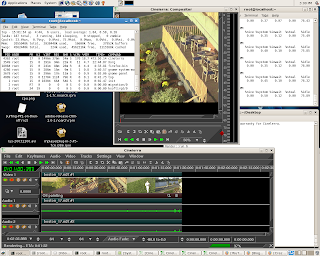
So then I ran a Cinelerra project with a more computationally intense render (one with an Oil Painting effect applied to an HDV track), CPU utilization is now up to 80-90% per cpu (attached graphic):

Here's the test video:
Analysis
There are many cores and they are relatively low speed (1.6Ghz). As Cinelerra takes advantage of all the processors, each CPU is working on a task (the render) and those tasks process at the speed of each corresponding CPU. In other words, as fast as each individual processor can handle. So simple tasks, like rendering raw HDV video with no effects, don't take up much individual CPU. However, more computationally intense tasks, like adding the oil painting effect to a video, utilize more of each CPU. Thus, the video rendered with the oil paint effect takes more CPU horsepower than the simple, no effect render.
This server is kind of like having a big dump truck. The thing has a powerful engine and can haul a ton of stuff, but can't go very fast. Unlike a Ferrari that can't handle much luggage, but can go super fast. I think we might see that a box with faster CPUs would get simple renders done quicker than what my Dell can do, but it might choke on renders with lots of complex effects.
Now if I could only harness these CPUs for speed! I'd be interested in getting people's opinions on 64-bit and multicore operation, as this is my first multicore/64 system.
Other Observations on 64-bit Fedora Core 6
1) I see that command-line ffmpeg is not multithreaded for multi processing machines. I will have see if I can use the external ffmpeg compile option in Cinelerra.
2) I can't get an NVidia card to work in this box. Much pain listed here:
http://forums.anandtech.com/messageview.aspx?catid=31&threadid=2080542
3) The Adobe Flash plugin only works in 32-bit mode Firefox
more to come,
the crazed mule
http://www.techanswerguy.com/2007/09/setting-up-dell-sc1430.html
Update 2008/02/03
Here are some related articles:
/2007/10/multithreading-in-ffmpeg-and-mpstat.html
/2007/10/rendering-on-dual-quad-core.html
*** end update ***
Eight Core Power!
I see from the output of /proc/cpuinfo, that I've got eight processors (first and last listed below):
[root@localhost ~]# cat /proc/cpuinfo
processor : 0
vendor_id : GenuineIntel
cpu family : 6
model : 15
model name : Intel(R) Xeon(R) CPU E5310 @ 1.60GHz
stepping : 7
cpu MHz : 1595.929
cache size : 4096 KB
physical id : 0
siblings : 4
core id : 0
cpu cores : 4
fpu : yes
fpu_exception : yes
cpuid level : 10
wp : yes
flags : fpu vme de pse tsc msr pae mce cx8 apic sep mtrr pge mca cmov pat pse36 clflush dts acpi mmx fxsr sse sse2 ss ht tm syscall nx lm constant_tsc pni monitor ds_cpl vmx tm2 cx16 xtpr lahf_lm
bogomips : 3195.17
clflush size : 64
cache_alignment : 64
address sizes : 36 bits physical, 48 bits virtual
power management:
...
processor : 7
vendor_id : GenuineIntel
cpu family : 6
model : 15
model name : Intel(R) Xeon(R) CPU E5310 @ 1.60GHz
stepping : 7
cpu MHz : 1595.929
cache size : 4096 KB
physical id : 1
siblings : 4
core id : 3
cpu cores : 4
fpu : yes
fpu_exception : yes
cpuid level : 10
wp : yes
flags : fpu vme de pse tsc msr pae mce cx8 apic sep mtrr pge mca cmov pat pse36 clflush dts acpi mmx fxsr sse sse2 ss ht tm syscall nx lm constant_tsc pni monitor ds_cpl vmx tm2 cx16 xtpr lahf_lm
bogomips : 3191.96
clflush size : 64
cache_alignment : 64
address sizes : 36 bits physical, 48 bits virtual
power management:
HDV Render Test: Project with no effect
Now that I've got her up, I'm testing a render of 40 minutes of MPEG-TS HDV content. While rendering, it seems that my CPUs are sloughin about..only about 30% busy. What is going on here? Shouldn't all the CPUs be working at 100%?

Here is the output of iostat, showing 70% idle CPUs:
Time: 12:14:23 AM
avg-cpu: %user %nice %system %iowait %steal %idle
27.75 0.00 0.60 1.00 0.00 70.65
Time: 12:14:28 AM
avg-cpu: %user %nice %system %iowait %steal %idle
27.35 0.00 0.37 0.95 0.00 71.33
Top seems a little funny too, whereby the third line down shows 27.4%, near what iostat reports, but then the listed CPU utilization for Cinelerra is about 220 in the process list below:
top - 00:15:42 up 46 min, 4 users, load average: 2.83, 2.35, 1.82
Tasks: 186 total, 2 running, 184 sleeping, 0 stopped, 0 zombie
Cpu(s): 27.4%us, 0.4%sy, 0.0%ni, 70.9%id, 1.2%wa, 0.0%hi, 0.0%si, 0.0%st
Mem: 2055048k total, 2038468k used, 16580k free, 736k buffers
Swap: 4562440k total, 632k used, 4561808k free, 514344k cached
PID USER PR NI VIRT RES SHR S %CPU %MEM TIME+ COMMAND
5640 root 17 0 3170m 1.0g 45m S 220 53.2 41:39.23 cinelerra
3540 root 15 0 183m 89m 34m S 1 4.4 6:43.95 Xorg
I will investigate that inconsistency later.
The render finished in about 50 minutes, so that's a little bit longer than Heroine Warrior's assertion that encoding HD content with a 64-bit system should be in realtime:
http://www.heroinewarrior.com/cinelerra7.php3
HDV Render Test 2: Project with Oil Painting effect
So then I ran a Cinelerra project with a more computationally intense render (one with an Oil Painting effect applied to an HDV track), CPU utilization is now up to 80-90% per cpu (attached graphic):

Here's the test video:
Analysis
There are many cores and they are relatively low speed (1.6Ghz). As Cinelerra takes advantage of all the processors, each CPU is working on a task (the render) and those tasks process at the speed of each corresponding CPU. In other words, as fast as each individual processor can handle. So simple tasks, like rendering raw HDV video with no effects, don't take up much individual CPU. However, more computationally intense tasks, like adding the oil painting effect to a video, utilize more of each CPU. Thus, the video rendered with the oil paint effect takes more CPU horsepower than the simple, no effect render.
This server is kind of like having a big dump truck. The thing has a powerful engine and can haul a ton of stuff, but can't go very fast. Unlike a Ferrari that can't handle much luggage, but can go super fast. I think we might see that a box with faster CPUs would get simple renders done quicker than what my Dell can do, but it might choke on renders with lots of complex effects.
Now if I could only harness these CPUs for speed! I'd be interested in getting people's opinions on 64-bit and multicore operation, as this is my first multicore/64 system.
Other Observations on 64-bit Fedora Core 6
1) I see that command-line ffmpeg is not multithreaded for multi processing machines. I will have see if I can use the external ffmpeg compile option in Cinelerra.
2) I can't get an NVidia card to work in this box. Much pain listed here:
http://forums.anandtech.com/messageview.aspx?catid=31&threadid=2080542
3) The Adobe Flash plugin only works in 32-bit mode Firefox
more to come,
the crazed mule
If this post was useful to you..consider buying me a beer via PayPal!
Even a $1 Draft will keep the Mule happily working..and help pay for equipment upgrades!
Thursday, September 27, 2007
building Cinelerra on FC6 64-bit
Update 10/26/2007:
These instructions work well for F7 (Fedora 7), 64-bit, too!
Update 10/29/2008:
These instructions still kick ass..a year later when I blew up my system!
Update 11/20/2008:
I've rebuilt my Fedora 7 system as Fedora 9. The Cinelerra build instructions are different than the Fedora 7 instructions in that they use ATrpms repository. But all-in-all, the install went well!
I just purchased a Dell SC1430 dual Xeon, quad-core server to replace my aging Dell SC400 tower. I will give a full review of that server in a later post. More immediately however, I thought I'd give the 64-bit Fedora Core 6 installation a whirl, as these Xeons support 64-bit. I figured that Cinelerra should fly with 64-bit install! Also, to ease my pain, I figured I'd stay with FC6, as I'm well familiar with this distribution. Eventually, I'll build out a 64-bit Debian Lenny distro to see how that performs (thanks for the suggestion, Graham)!
Here's How Things Went
The Fedora install is the same installer you get with the 32-bit version and went very smoothly.
I then proceeded to install the dependencies for building Cinelerra from source. In a nutshell, the yum installation was very similar to my 32-bit FC6 install which I described here, with some minor differences:
/2007/03/fedora-core-6-cinelerra-dependencies.html
The quick steps are:
1) have the proper yum repositories online (all Fedora, Livna and Dries)
2) make sure you have your GPG-KEYs loaded from Livna and Dries
3) remove the dries repositories (with the --disablerepo=dries switch shown) and install using the script below with only Fedora and Livna online:
4) remove the Livna repositories, enable FreshRPMs and install mjpegtools using the command:
yum --disablerepo=livna install mjpegtools*
5) get Cinelerra source code (refer to previous post on those details)
6) build from source (refer to previous post on those details)
7) install your favorite multimedia applications
The only differences between the 32-bit install and the 64-bit install that I noticed were that I had to specify the install of fftw specifically on 64-bit:
1) fftw (instead of fftw3)
2) fftw-devel
I've amended the script below to reflect those differences. Another interesting note is that with FC6 and above, no SMP-specific kernel is necessary. This is good! Finally, I installed my favorite multimedia apps:
yum install avidemux mencoder mplayer transcode vlc* xmms
However, to avoid this error, you should install xine separately without Livna repos online:
yum --disablerepo=livna install xine
I haven't gotten to really test out Cinelerra's capabilities on 64-bit, but I did render out a 40 minute Cinelerra project with full 720P HDV in a little over an hour. I rendered using QT container, MPEG-4 video compression with a constant bit rate of 10,000,000 and twos complement audio. This *almost* achieves what Heroine Warrior states about being able to achieve real-time rendering with HDV. Obviously, I believe some performance tweaks are in order and will need to work through these issues.
Here is that yum script which should get you going on 64-bit Fedora Core 6:
The Cinelerra FC6 64-bit Source Dependencies Install Script
yum install --disablerepo=dries \
libquicktime \
ffmpeg \
gsm-devel \
xvidcore* \
lame \
lame-devel \
libvorbis* \
libogg* \
libtool* \
a52* \
libtheora* \
libpng* \
libjpeg* \
libtiff* \
esound* \
audiofile* \
libraw1394* \
libavc1394* \
freetype* \
fontconfig* \
nasm \
e2fsprogs* \
faad2-dev* \
OpenEXR* \
fftw \
fftw-devel \
libsndfile* \
libiec61883* \
x264 \
x264-d* \
faac* \
libdv*
Don't forget to chmod a+x the file!
cheers,
the mule
These instructions work well for F7 (Fedora 7), 64-bit, too!
Update 10/29/2008:
These instructions still kick ass..a year later when I blew up my system!
Update 11/20/2008:
I've rebuilt my Fedora 7 system as Fedora 9. The Cinelerra build instructions are different than the Fedora 7 instructions in that they use ATrpms repository. But all-in-all, the install went well!
I just purchased a Dell SC1430 dual Xeon, quad-core server to replace my aging Dell SC400 tower. I will give a full review of that server in a later post. More immediately however, I thought I'd give the 64-bit Fedora Core 6 installation a whirl, as these Xeons support 64-bit. I figured that Cinelerra should fly with 64-bit install! Also, to ease my pain, I figured I'd stay with FC6, as I'm well familiar with this distribution. Eventually, I'll build out a 64-bit Debian Lenny distro to see how that performs (thanks for the suggestion, Graham)!
Here's How Things Went
The Fedora install is the same installer you get with the 32-bit version and went very smoothly.
I then proceeded to install the dependencies for building Cinelerra from source. In a nutshell, the yum installation was very similar to my 32-bit FC6 install which I described here, with some minor differences:
/2007/03/fedora-core-6-cinelerra-dependencies.html
The quick steps are:
1) have the proper yum repositories online (all Fedora, Livna and Dries)
2) make sure you have your GPG-KEYs loaded from Livna and Dries
3) remove the dries repositories (with the --disablerepo=dries switch shown) and install using the script below with only Fedora and Livna online:
4) remove the Livna repositories, enable FreshRPMs and install mjpegtools using the command:
yum --disablerepo=livna install mjpegtools*
5) get Cinelerra source code (refer to previous post on those details)
6) build from source (refer to previous post on those details)
7) install your favorite multimedia applications
The only differences between the 32-bit install and the 64-bit install that I noticed were that I had to specify the install of fftw specifically on 64-bit:
1) fftw (instead of fftw3)
2) fftw-devel
I've amended the script below to reflect those differences. Another interesting note is that with FC6 and above, no SMP-specific kernel is necessary. This is good! Finally, I installed my favorite multimedia apps:
yum install avidemux mencoder mplayer transcode vlc* xmms
However, to avoid this error, you should install xine separately without Livna repos online:
yum --disablerepo=livna install xine
I haven't gotten to really test out Cinelerra's capabilities on 64-bit, but I did render out a 40 minute Cinelerra project with full 720P HDV in a little over an hour. I rendered using QT container, MPEG-4 video compression with a constant bit rate of 10,000,000 and twos complement audio. This *almost* achieves what Heroine Warrior states about being able to achieve real-time rendering with HDV. Obviously, I believe some performance tweaks are in order and will need to work through these issues.
Here is that yum script which should get you going on 64-bit Fedora Core 6:
The Cinelerra FC6 64-bit Source Dependencies Install Script
yum install --disablerepo=dries \
libquicktime \
ffmpeg \
gsm-devel \
xvidcore* \
lame \
lame-devel \
libvorbis* \
libogg* \
libtool* \
a52* \
libtheora* \
libpng* \
libjpeg* \
libtiff* \
esound* \
audiofile* \
libraw1394* \
libavc1394* \
freetype* \
fontconfig* \
nasm \
e2fsprogs* \
faad2-dev* \
OpenEXR* \
fftw \
fftw-devel \
libsndfile* \
libiec61883* \
x264 \
x264-d* \
faac* \
libdv*
Don't forget to chmod a+x the file!
cheers,
the mule
If this post was useful to you..consider buying me a beer via PayPal!
Even a $1 Draft will keep the Mule happily working..and help pay for equipment upgrades!
Subscribe to:
Posts (Atom)


