Showing posts with label distribution. Show all posts

Saturday, November 22, 2008

video distribution and the blogosphere

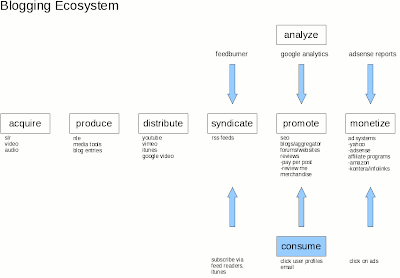
After having this blog for a few years now, I've been thinking about the entire chain of events that occur when producing a video. So I mapped out the different components of this production workflow in relation to distribution and marketing via the blogosphere.

The Blogging Ecosystem
In the clickable map below, I've listed the major steps in the production chain, as well as specific subjects within each step. Go ahead and click on anything in the picture and it will take you to a summary of that particular topic or a direct resource on the web. Some of this is old hat for readers, but it was helpful to see it holistically, as an ecosystem of sorts. The flow represents a way to distribute one's video creations (content) over the web and get some eyes looking at that content.


(the graphic is hotlinked, so click on a subject for further investigation)

Summary
In general, the white boxes represent steps that the producer is responsible for; the blue box represent actions taken by the consumers of the content. The main steps are:
-having an idea for a video and storyboarding (not shown)
-acquiring source content (video/audio/imagery)
-bringing the idea to life via a production workflow
-distributing that video via the web
-syndicating the content via rss feed
-having individuals consume that feed
-monitoring and analyzing the consumption
-promoting and marketing of content
-perhaps making some money one day

Detail
If you click on any part of the graph, you'll be able to dig down further into the resources I've provided. As it will require some explaining, I'll probably do a follow up video to this graphic.

Enjoy!

Saturday, October 04, 2008

iTunes/iPod video workflow, scripted

I am going to revisit my conversation about workflow. Here's what we briefly discussed:
- the transformation of an idea (video) into reality and distributing it (in this case, using iTunes)

With today's internet, the steps involved are broad-based:
- idea creation, storyboard, distribution, production, archiving, marketing

Update 2008/11/22
I've added a few more details to my workflow in a new post here.
end update

I shall give you an example and how I reduced the amount of time spent creating and distributing my content.

When not working, my world is playing music with a band of itinerant musicians called the StormPigs. We gather together once every couple of months to play freeform music. No prior thought involved, just play. The joy of this is being together and having a good time. Otherwise, we are all busy professionals with full-time jobs and families. In remembrance of that good time, I produce videos of the event, distributed via iTunes and YouTube.

As time seems compressed these days, I want to spend as little time as possible behind the keyboard (though I am a technologist by trade). And as readers of this blog know, I am avid proponent of Linux. The beauty of Linux is that the system is completely configurable and flexible. But with this power comes a price. You have to invest the time to learn the shell, some bits of scripting and other Linux arcana. Consequently, it is daunting to the newcomer. But the benefits return to you many times over, as time you once spent on minutiae can now be spent thinking of new ideas for shows and creating new content, rather than simply focusing on the details of getting a file up to the server or copy and pasting content from one application to the other.

I am not a programmer of fanciful GUI front ends. I am a guy who just needs to get work done. So I try to solve my problems in the simplest way possible using the Linux programs and bash shell scripts to tie multiple programs together.

Here is the latest problem I needed to solve:
- how to I get my videos onto the web and in an iTunes ready form as quickly as possible?

In that light, I have come up with some scripts to help me on my way:
- the first encodes my editing video project into various formats (HDV, DVD, podcast)
- the second creates the list of songs from the video that will go into the podcast
- the third merges that songlist information into the podcast
- the fourth creates a new iTunes RSS feed (XML file) from the songlist information
- the fifth uploads the new podcast to my webserver
- the last is a wrapper that starts the other five

The encoding script is most useful and is the basis for the others. This script takes 720P video and 48Khz MPEG, Layer II stereo audio output rendered from a Cinelerra project and converts it to various formats: MPEG2 Program Stream, HDV, DVD and iTunes/iPod compatible formats. You will need the following programs installed for this script to work:
-mplex
-vlc
-ffmpeg

I've found the quality of each output file to be very good to excellent.

You can wrap some validation and input around this script, but the guts of the script look like this, where the arguments enclosed in curly braces will be replaced by the names of your input and output files:
#!/bin/bash
echo "Input: M2A audio and MPEG2 720P video streams"

echo "Output: program stream"
mplex -f 3 -b 2000 ${AUDIO} ${VIDEO} -o ${PS}

echo "Input: program stream"
echo "Output: MPEG2-TS, HDV"
vlc ${PS} --sout '#duplicate{dst=std{access=file,mux=ts,dst="'${HDV}'"}}' vlc:quit


echo "Input: MPEG2-TS, HDV"
echo "Output: MPEG2 DVD"
ffmpeg -i ${HDV} -target dvd -threads 8 ${DVD}

echo "Input: MPEG2 DVD"
echo "Output: iTunes/iPod compatible MP4"
ffmpeg -y -i ${DVD} -an -v 1 -threads 8 -vcodec h264 -b 250k -bt 175k -refs 1 -loop 1 -deblockalpha 0 -deblockbeta 0 -parti4x4 1 -partp8x8 1 -me full -subq 1 -me_range 21 -chroma 1 -slice 2 -bf 0 -level 30 -g 300 -keyint_min 30 -sc_threshold 40 -rc_eq 'blurCplx^(1-qComp)' -qcomp 0.7 -qmax 51 -qdiff 4 -i_qfactor 0.71428572 -maxrate 450k -bufsize 2M -cmp 1 -s 720x480 -f mp4 -pass 1 /dev/null

ffmpeg -y -i ${DVD} -v 1 -threads 8 -vcodec h264 -b 250k -bt 175k -refs 1 -loop 1 -deblockalpha 0 -deblockbeta 0 -parti4x4 1 -partp8x8 1 -me full -subq 6 -me_range 21 -chroma 1 -slice 2 -bf 0 -level 30 -g 300 -keyint_min 30 -sc_threshold 40 -rc_eq 'blurCplx^(1-qComp)' -qcomp 0.7 -qmax 51 -qdiff 4 -i_qfactor 0.71428572 -maxrate 450k -bufsize 2M -cmp 1 -s 720x480 -acodec aac -ab 160k -ar 48000 -ac 2 -f mp4 -pass 2 -threads 8 ${MP4}


Stay tuned for discussions of the remaining scripts to make your life easier,
CM
Friday, February 08, 2008

Why Cinelerra?

I received a question from a person unfamiliar with Cinelerra and I thought that my response should be shared. The person has a friend who runs Cinelerra in Ubuntu and he wanted a more experienced users' perspective on how Cinelerra compares to the more established, commercial packages like Premiere or Vegas. Here is how I responded to him.

Cinelerra is very powerful software if you can overcome some of its idiosyncracies. Idiosyncracies like:
1) it is difficult to install for most people
2) it sometimes crashes. There are more crashes on 32-bit systems. However, the consequences of a crash aren't bad, as you can simply restart Cinelerra, load the automatically generated backup file and pick up where you left off.
3) rendering to final formats is challenging

Cinelerra is buggy in a consistent way. In other words, if you have the time and energy to figure out what works and what doesn't work, then you can base a workflow around that. But that effort is a huge time sink.

It doesn't get any better when you upgrade your system, because what once
worked in a previous distro will break in your new distro. So, you spend
oodles of time figuring out how to fix it.

It takes a certain kind of person who relishes the constant challenges of Cinelerra and Linux to power through these difficulties. Cinelerra is not everyone's cup of tea for sure, but you can get usable content out of Cinelerra if you know what works and what doesn't. Otherwise, save your valuable time and effort, buy a dual quad core Mac or PC with Final Cut Pro or Avid or Premiere or Vegas and be happy that everything works out of the box. Which isn't always the case even with those softwares.

Because Cinelerra is free software, it will never be as well supported as those commercial products. That being said, I have Cinelerra installed on Fedora 10 x86, 64-bit and the only time it has crashed is when I've done something stupid like try to write to a filesystem that is full or trigger a known bug, like using the broken DV import-record function.

I have spent the last two years learning the software and documenting specific processes using Cinelerra. You might glean some useful information by subscribing to my blog's RSS feed, because it documents the challenges I face in getting the software to work properly:
http://crazedmuleproductions.blogspot.com/

I would suggest that a 64-bit machine is most stable for Cinelerra, moreso than a 32-bit machine. That is due to the fact that the 64-bit build will take full advantage of the memory resources on your computer and video editing is very taxing on a computers memory.

From the conversations on http://cvs.cinelerra.org/, the largest installed base of users seems to be on Ubuntu, Fedora and Debian distros. I would suggest starting with one of those distros, as many people on the CVS will be able to help you if you encounter problems.

There are two versions of Cinelerra. The original version you can get from http://www.heroinewarrior.com/, but the author does not support the software. The most actively supported version of the software is the Community Version (CV) and can be found on http://cvs.cinelerra.org/. That community of which I am part, has done significant work to fix bugs, accumulate and pass on knowledge to people interested in this great, free software and video editing in general.

The RPMFusion repository is the one main Fedora repository has Cinelerra RPMs for most recent Fedora versions:
rpmfusion.org
Information on installing Cinelerra for all other distributions can be found here:
http://cvs.cinelerra.org/getting_cinelerra.php

Here is a list of related articles regarding first-time installations on Fedora:
Getting Started with Cinelerra
Building Cinelerra on 64-bit Fedora 9 from Source
Beginner's Guide to Exporting Video from Cinelerra
Exports and Linux Player Compatibility Chart from the article Render Compatibility on Fedora 10, x86-64
Cinelerra for Grandma

Finally, if you don't want to fuss with your own install, you may download one of two VMware virtual machines that I have created specifically for video editing with Cinelerra and all the tools you need to get started:
Fedora Core 6, 32-bit VMware virtual machine ~1GB
Fedora 10, x86-64 VMware virtual machine ~3GB

The Mule

Monday, February 12, 2007

the big picture

With the dualdvd archive piece and scripted workflow, I was able to optimize a couple of pieces of the video production lifecycle:

idea creation -> storyboard -> production -> distribution -> marketing -> archive

Update 2008/11/22
I've added a few more details to my workflow in a new post here.
end update

I fear I'm spending too much time on the production piece and all the associated technical details. However, from a business perspective, the devil is in the details and if you have a good workflow, that means that you can do more in less time and be able to dedicated more time to the more creative/marketing aspects. So I don't think it is for nothing that I am doing this. Too bad I can't get those darn Ximeta NDAS drivers to work on Linux!!